VPN Access for MBI
Staff (Off-Site Use)

For MBI Staff: Using VPN to connect to internal resources from off-site

During the current COVID-19 outbreak, many MBI teams and personnel are working remotely. VPN provides a way to logically connect an off-site computer to resources connected to internal networks at MBI and NUS.

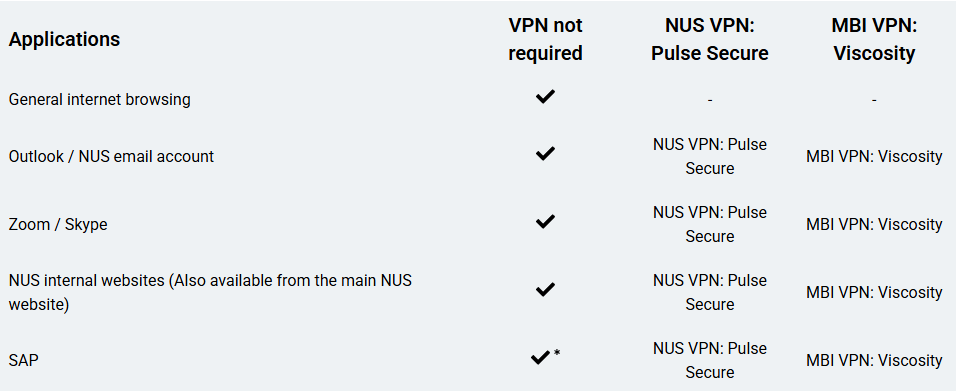
Summary of VPN Usage Recommendations

Applications

VPN not required

NUS VPN: Pulse Secure

MBI VPN: Viscosity

General internet browsing

-

-

Outlook / NUS email account

NUS VPN: Pulse Secure

MBI VPN: Viscosity

Zoom / Skype

NUS VPN: Pulse Secure

MBI VPN: Viscosity

NUS internal websites (Also available from the main NUS website)

NUS VPN: Pulse Secure

MBI VPN: Viscosity

SAP

NUS VPN: Pulse Secure

MBI VPN: Viscosity

*Access to the MBI storage server is temporarily available from the NUS network during the Corvid-19 work schedule restrictions.

Installing the NUS nVPN client

From the NUS Inside website at nus.edu.sg/inside-nus, choose: Off Campus > Connect to VPN and follow the instructions.

  • Window users with existing Pulse Secure installed, use this guide.
  • Window users without Pulse Secure installed, use this guide.
  • Mac OS users with existing Pulse Secure installed, first you must delete the application from your Applications folder. Then re-install it using this guide.